Smart Design Font for Web Projects
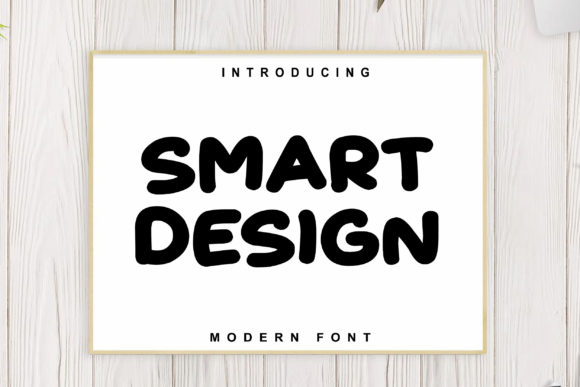
As a web designer, choosing the right font can transform a layout from ordinary to unforgettable. Smart Design is a display font that brings a fresh, playful energy to digital projects. Its clean lines and friendly curves make it ideal for creative websites, educational platforms, and brand-centric experiences.
Smart Design embodies a modern, approachable tone. It’s not just a typeface—it’s a design tool that adds personality without overwhelming the user. Whether you’re working on a children’s activity site or a professional landing page, this font adapts well to different contexts while maintaining its unique character.
Using Smart Design in Web Layouts
Smart Design excels in headers, hero sections, and call-to-action buttons. Its legibility at larger sizes makes it perfect for titles that need to grab attention. For example, a creative portfolio site might use Smart Design for project headings, giving each section a distinct, engaging look.
In online stores, Smart Design can highlight product names or promotional banners. Its visual appeal helps create a memorable brand presence, especially when paired with a neutral sans serif for body text. This contrast ensures readability while keeping the design cohesive.
For blog headers or social media graphics, Smart Design adds a touch of creativity without sacrificing clarity. It works well on mobile screens, where space is limited and visual hierarchy is crucial. When used on dark backgrounds or image overlays, the font remains legible, making it versatile for responsive designs.
Smart Design and Visual Hierarchy
Visual hierarchy is key in web design, and Smart Design supports this by standing out as a primary element. It’s best suited for short phrases, logos, and decorative accents rather than long paragraphs. Using it for section headings or CTA buttons helps guide users through content effectively.
On a coaching website, Smart Design could be used for course titles or motivational quotes. The font’s friendly appearance reinforces trust and approachability, which is essential for building a connection with the audience. In a product landing page, it can emphasize key selling points, making them more noticeable and impactful.
Font Pairing and Brand Identity
When pairing Smart Design with other fonts, consider balance and contrast. A simple sans serif like Open Sans or Roboto works well for body copy, allowing Smart Design to shine as a focal point. For a more editorial feel, pairing it with a serif font like Georgia or Playfair Display can add sophistication.
In a digital brand kit, Smart Design can serve as the main logo font, ensuring consistency across all touchpoints. It’s also useful for packaging design or social media assets, where a strong visual identity is needed. Its versatility allows it to fit into both modern and traditional brand aesthetics.
Practical Considerations for Web Use
Before using Smart Design, check the available styles, weights, and file formats. Webfont availability is crucial for seamless integration into websites and digital products. Ensure the font supports the languages your audience uses, especially if your site has an international reach.
Commercial licensing is another important factor. Make sure the font license covers your intended use, whether it’s for a personal project, client work, or an online store. Proper licensing protects both you and your clients from potential legal issues.
When designing for small buttons or mobile screens, test Smart Design at different sizes to ensure it remains readable. Avoid using it in dense text blocks, as it may reduce legibility. Instead, use it as a decorative element or for short, impactful phrases.
Smart Design in Digital Products
Smart Design is ideal for digital products such as templates, app interfaces, and online courses. Its friendly style aligns well with educational and creative platforms, making it a great choice for course pages or learning management systems. It adds a sense of fun and engagement without distracting from the core content.
For a boutique online store, Smart Design can enhance product titles or category headers. It creates a cohesive, branded look that reflects the store’s personality. When used in conjunction with high-quality images and clear CTAs, it contributes to a polished, professional user experience.
Whether you're designing a SaaS landing page or a personal blog, Smart Design offers a unique blend of playfulness and professionalism. It’s a font that speaks to both the heart and the mind, making it a valuable addition to any designer’s toolkit.
By incorporating Smart Design into your web projects, you can create visually compelling layouts that resonate with your audience. Its ability to enhance readability, support visual hierarchy, and reinforce brand identity makes it a powerful asset for designers and creators alike.